
Step 3: order on PonyBuy
Nine steps, two payments
PonyBuy splits the job into a purchase sequence and a parcel sequence, with your goods sitting in a warehouse in between. Knowing which half you are in explains most of the waiting.
Where this page sits
- 01Pick a category
- 02Open the item
- 03Order on PonyBuy
- 04See QC photos
- 05Combine and ship
- 06Your door
The nine steps mapped onto the six
- 01Pick a category
- 02Open the item
- 03Order on PonyBuy
- 04See QC photos
- 05Combine and ship
- 06Your door
Steps one to five turn a product link into goods sitting in a warehouse. Steps six to nine move those goods to your door. The pause in the middle is yours to control.
Half one
Buying: five steps
- 01
Select the item
Paste the seller link into the PonyBuy search bar, or type a product name and pick from the suggestions drawn from Taobao, Tmall and 1688. Browsing a category is how most people get that link in the first place.
- 02
Submit the order
The listing loads with its colour, size and quantity options and you choose from an English interface, then add to cart or buy now. This is also where you add remarks for the buyer and any value added services.
- 03
Pay for the itemspayment 1
You pay the item price plus the domestic delivery from the seller to the PonyBuy warehouse. Card, WeChat and Alipay are listed in the guide, and the checkout also shows PayPal, Stripe and a prepaid balance. International shipping is not part of this payment.
- 04
PonyBuy buys from the seller
Staff place the order with the Chinese seller and chase it. If the seller needs something from you, the order enquiry thread is where that conversation happens.
- 05
Inspection and storage
The item arrives at the warehouse, is checked for defects and photographed, and appears under Warehouse in your user centre. This is the decision point: you have paid for the item but not for shipping it home.
The pause in the middle is the point
Between step five and step six your goods sit in a Chinese warehouse and nothing happens until you decide it should. That gap is the feature people misread as a delay.
Storage is free for 90 days, counted from the moment the order status becomes stored. PonyBuy is explicit about the other end of that window: past 90 days with no delivery order submitted and no response from you, the goods are treated as abandoned and destroyed.
Used well, the pause is how a single parcel comes to hold four orders from four sellers, which is where the real saving on this route lives.
Half two
Sending it home: four steps
- 01
Submit for delivery
Open Warehouse, tick the items you want in this parcel, and submit a delivery order with the destination address. Some items are restricted to particular lines, and the interface flags which ones.
- 02
Pay the international shipping depositpayment 2
Shipping is quoted once the parcel is real and weighed. Customs declaration and any value added services are settled here too.
- 03
PonyBuy ships
The parcel is repacked, declared and handed to the carrier. Tracking appears against the parcel in your user centre.
- 04
Wait, then receive
Transit time depends almost entirely on the line. PonyBuy's own customs guidance gives air to Europe as usually 5 to 12 days and sea to the United States as usually 30 to 45 days, measured from dispatch.
The two payments, side by side
Almost every complaint that starts with "I was charged twice" is this structure working as designed rather than a fault.
- Payment 1When you place the orderItem price plus the domestic delivery from the seller to the PonyBuy warehouse.
- Payment 2When you send the parcel outInternational shipping deposit, plus customs declaration and any value added services.
Source: PonyBuy Beginner's Guide steps 3 and 7, read 2026-08-03.
Where to look while you wait
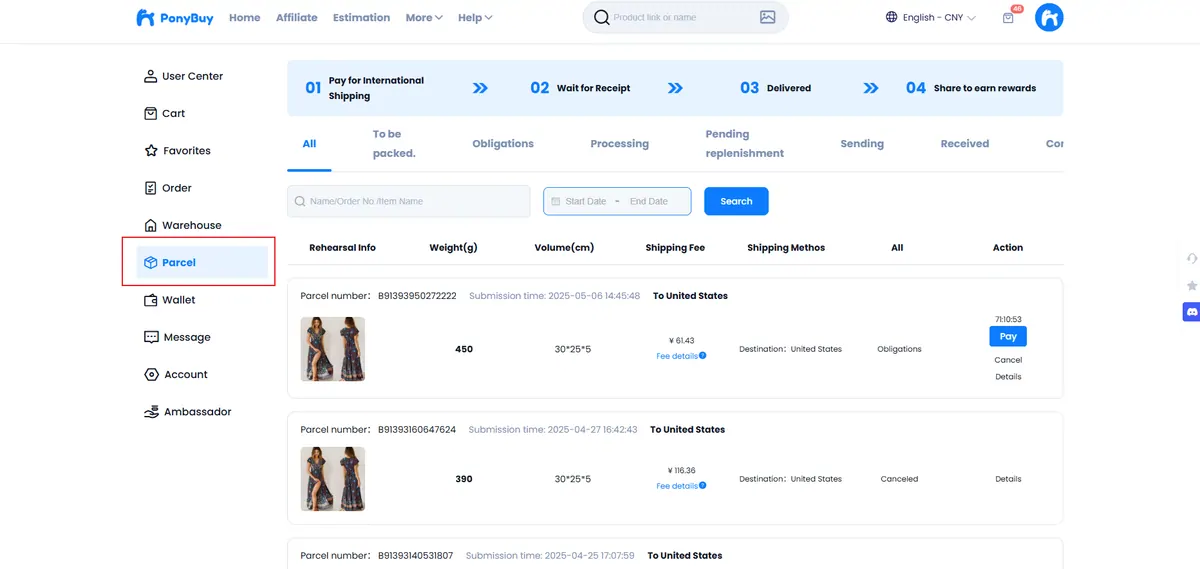
Two screens carry everything. Warehouse lists the goods that have arrived and been checked but not yet shipped. Parcel lists the shipments you have submitted, with a status against each.
The status worth understanding is stored, because it is the one that starts the 90 day clock. The status that ends your involvement is delivered.
If a step stalls for longer than feels right, the order enquiry thread on that specific order reaches the people who can actually see it. A generic contact form will get routed there anyway.
Where to go next
- Goes to ponybuy.com
Order it on PonyBuy
Paste the link, pick colour and size, pay, see the quality check photos, then combine your items into one parcel when you are ready.
Open ponybuy.comPartner link. Costs you nothing extra. We cannot see or change your orders.